> For the complete documentation index, see [llms.txt](https://docs.tricloudnexus.io/llms.txt). Markdown versions of documentation pages are available by appending `.md` to page URLs; this page is available as [Markdown](https://docs.tricloudnexus.io/management-portal/oee/equipment/states-mapping.md).

# States Mapping

Map every value the Equipment Run State tag emits to an Availability Category so the engine knows which time counts as productive.

The **States** tab on an Equipment translates the raw values emitted by the [Equipment Run State](/management-portal/oee/equipment/tag-mapping/state-and-error-codes.md#equipment-run-state) tag into **Availability Categories**. Until each emitted value is mapped, the engine treats it as an unknown state and does not credit Availability for it.

The tab is a simple grid with **State**, **Description**, and **Availability Category** columns plus the standard Add / Edit / Delete toolbar.

<figure><img src="https://570593659-files.gitbook.io/~/files/v0/b/gitbook-x-prod.appspot.com/o/spaces%2FYMGRODsc2QD3N3wmfwTl%2Fuploads%2Fgit-blob-b4d849c76bca081b05e63b32c2b446552f08b092%2Foee-states-tab.png?alt=media" alt=""><figcaption><p>States tab — each raw equipment state value mapped to an Availability Category (Running, Unplanned Stop, Planned Stop, or Idle)</p></figcaption></figure>

***

## How a state mapping is structured

| Column                    | Notes                                                                                                                                                                                                                                                                                                                                                                                                                              |
| ------------------------- | ---------------------------------------------------------------------------------------------------------------------------------------------------------------------------------------------------------------------------------------------------------------------------------------------------------------------------------------------------------------------------------------------------------------------------------- |
| **State**                 | The value the run-state tag emits, compared **case-insensitively** as a string. Strings (`Running`, `Stopped`, `Idle`) and numeric values are both supported — they’re compared as their string representation. For boolean output from a [Calculation](/management-portal/oee/equipment/tag-mapping/calculations.md) like `a>b`, the value arrives as the numeric 1 (true) or 0 (false), so the State rows should be `1` and `0`. |
| **Description**           | Free-text, optional. Shown in operator views and reports alongside the raw value.                                                                                                                                                                                                                                                                                                                                                  |
| **Availability Category** | One of the global [Availability Categories](/management-portal/oee/availability-categories.md). Drives the score: `Running` categories credit Availability, `Unplanned Stop` categories debit it, `Planned Stop` categories are excluded.                                                                                                                                                                                          |

For a typical packaging line, the minimum useful mapping is two rows:

| State     | Description     | Availability Category |
| --------- | --------------- | --------------------- |
| `Running` | Producing units | Running               |
| `Stopped` | Not producing   | Unplanned Stop        |

If the equipment emits more granular states (`Idle`, `Warming`, `Sanitizing`), add a row for each so the engine can classify them deliberately.

{% hint style="info" %}
The run-state tag only needs to emit **on change**. The engine carries the last reported state forward until a new value arrives ("step interpolation"), so a machine reported as `Running` at 09:05 counts as running from 09:05 until the next state change — you don't need a continuous stream of readings.
{% endhint %}

***

## Add a State mapping

1. Choose **Add** in the toolbar.
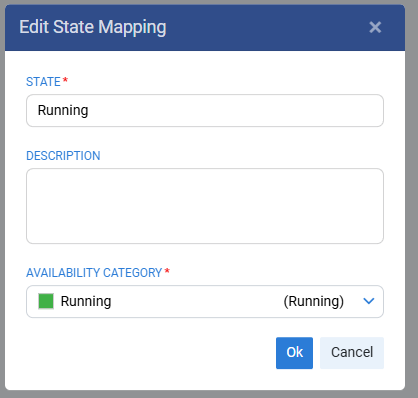
2. Fill in the dialog:

<figure><img src="https://570593659-files.gitbook.io/~/files/v0/b/gitbook-x-prod.appspot.com/o/spaces%2FYMGRODsc2QD3N3wmfwTl%2Fuploads%2Fgit-blob-12a897e07c066946be1727c2e9b8783805a7276e%2Foee-edit-state-mapping-dialog.png?alt=media" alt=""><figcaption><p>Edit State Mapping — State value, optional Description, Availability Category</p></figcaption></figure>

| Field                     | Required | Notes                                                                                                                                                                                |
| ------------------------- | -------- | ------------------------------------------------------------------------------------------------------------------------------------------------------------------------------------ |
| **State**                 | Yes      | The value the run-state tag emits, compared case-insensitively. Numeric values and booleans (from a Calculation) are also compared as their string form — see the column note above. |
| **Description**           | No       | Free-text.                                                                                                                                                                           |
| **Availability Category** | Yes      | Drop-down listing every Availability Category, with its color and category type shown.                                                                                               |

3. Choose **Ok**.

***

## Edit a State mapping

* Select the row and choose **Edit**, or double-click the row.
* The same dialog opens pre-populated; change the description or re-target the category as needed.
* You generally shouldn’t change the **State** value of an existing mapping — that effectively breaks the link to historical data. If the value the tag emits has changed, add a new mapping for the new value instead.

***

## Delete a State mapping

Select the row and choose **Delete**. Time previously attributed to that state remains in your history (Availability for past windows is not retroactively recomputed), but new emissions of that state will be unmapped until you re-add it.

***

## What "unmapped" means

If the run-state tag emits a value that has no row in this grid, the OEE engine falls through to a built-in default: **the value is treated as Running**. This is the platform’s behaviour and is not a per-Site or per-Equipment setting.

The fall-through is a safety net — not a feature you should rely on. Always add an explicit row for every value the run-state tag actually emits, so the classification is deliberate and auditable. To do so:

* Check the [Equipment Run State](/management-portal/oee/equipment/tag-mapping/state-and-error-codes.md#equipment-run-state) tag to confirm what values it’s actually emitting.
* Add a row for each value with the appropriate category.

If the run-state tag is itself a [Calculation](/management-portal/oee/equipment/tag-mapping/calculations.md) (e.g. `a>b` returning a boolean), the values reach the engine as the numeric `1` (true) and `0` (false), so the State rows should be `1` and `0`.

***

## How States Mapping interacts with Stop Causes

The two tabs are complementary:

| Source                                                                                                      | What it answers                                                              |
| ----------------------------------------------------------------------------------------------------------- | ---------------------------------------------------------------------------- |
| **States Mapping**                                                                                          | *Was the equipment running, or not running?* — classifies time bins.         |
| [**Stop Causes**](/management-portal/oee/equipment/stop-causes-and-error-codes.md) **+ Error Code Mapping** | *Why was it not running?* — attributes not-running time to specific reasons. |

A complete Availability picture needs both: States Mapping to recognize the stop, Stop Causes to explain it.

***

## Validation

| Condition                                                | Behavior                                                                                                              |
| -------------------------------------------------------- | --------------------------------------------------------------------------------------------------------------------- |
| Availability pillar enabled with zero State Mappings     | Allowed (you can stage configuration), but Availability will be `0` until at least one Running-typed state is mapped. |
| Two rows share the same State value                      | The grid allows duplicates at edit time, but the engine treats only one as authoritative — clean these up.            |
| Availability Category referenced by a mapping is deleted | Deletion is blocked — the platform does not allow removing a category that’s still in use.                            |

***

## Related

* [Equipment Run State](/management-portal/oee/equipment/tag-mapping/state-and-error-codes.md#equipment-run-state) — the tag this grid translates.
* [Availability Categories](/management-portal/oee/availability-categories.md) — the categories the dialog drop-down draws from; create or color them there.
* [Stop Causes & Error Codes](/management-portal/oee/equipment/stop-causes-and-error-codes.md) — explains *why* the equipment is not running, after States Mapping has classified that it isn’t.